

Every growing business reaches the same moment. Sales are improving, customers are asking for more, and the team is working hard. Yet something keeps slipping. Invoices go out late. Customer records are out of date. Emails sit unanswered. A new hire waits a week for a laptop.
None of these problems come from a lack of effort. They come from the work nobody sees: the back office.
Back office support services keep the daily operations behind your business running smoothly, so the people who serve customers and make decisions can do their best work. This guide explains what back office support covers, how each task connects to the others, how to tell when your business needs it, and what to look for when you set it up.
What Are Back Office Support Services?
Back office support services are the administrative and operational tasks that keep a company running but don't involve customers directly. If the front office is the storefront, the back office is the engine room.
Typical back office functions include:
- Administrative support and daily office coordination
- Data entry and database maintenance
- CRM updates and customer record management
- Email management and inbox organization
- Scheduling and calendar coordination
- Document organization and filing systems
- HR and staffing coordination
- Technology procurement and supplier coordination
A business can have a strong product and a talented sales team and still stall if these functions are inconsistent. That is why back office support is better understood as infrastructure than as an expense.
How the Back Office Connects to Business Growth
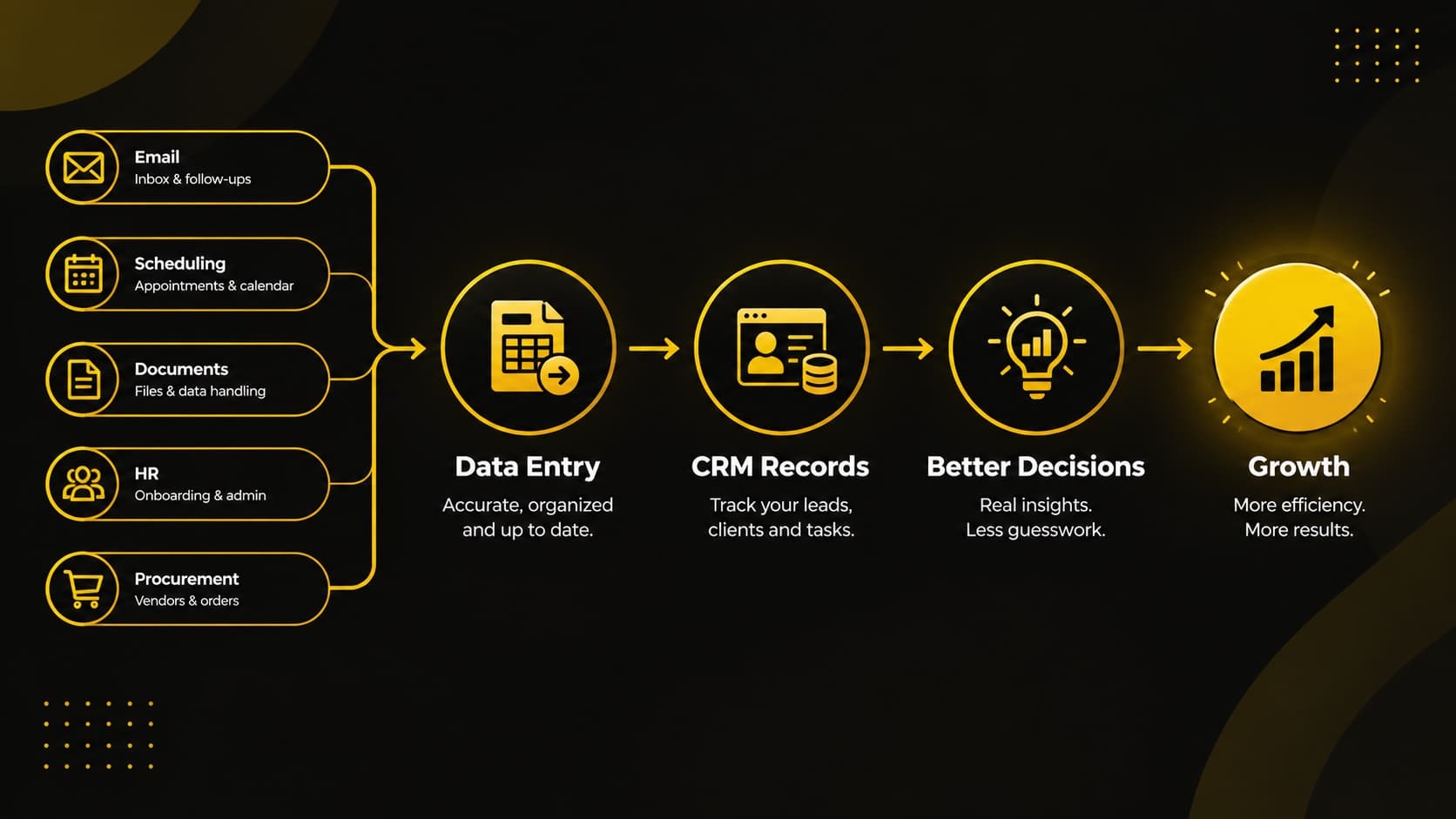
Back office tasks are not separate chores. They are linked, and a weakness in one spreads to the others. Seeing these connections is the best way to understand why the back office matters.
- Data entry feeds your CRM. When customer details, order information, and notes are entered accurately, your CRM becomes a reliable source of truth. When they aren't, your sales team works from guesses.
- Your CRM feeds your decisions. Managers use customer records to decide where to spend budget, which clients to follow up with, and which services to expand. Poor data produces poor decisions.
- Email and scheduling feed your relationships. A prompt reply and a well-organized calendar tell clients and partners that you are dependable. Missed messages and double-booked meetings tell them the opposite.
- Document organization feeds your speed. Contracts, invoices, and policies that can be found in seconds shorten approvals, audits, and onboarding.
- HR coordination feeds your capacity. Recruitment, onboarding, and staff records determine how quickly you can add people who contribute. A slow, disorganized hiring process delays growth.
- Technology procurement feeds your productivity. Laptops, monitors, software, and office equipment are the tools every other task depends on. Poorly chosen or late-arriving equipment slows everyone down.
Together these connections form a chain: accurate data leads to better records, better records lead to better decisions, and better decisions lead to growth. Strengthening one link strengthens the rest. Neglecting one weakens the whole chain.
Why data quality deserves attention: Gartner has estimated that poor data quality costs organizations an average of $12.9 million a year. Your numbers will be far smaller, but the pattern is the same: bad records create rework, missed follow-ups, and wrong decisions.
The Core Back Office Support Services Explained
Administrative Support
Administrative support is the daily coordination that holds a workplace together: preparing documents, tracking tasks, following up on approvals, handling routine requests, and keeping information moving between people.
Done well, it removes small delays that add up. Picture a small business owner who spends every Friday afternoon assembling quotes, chasing signatures, and updating a task list. Once that routine work is handled consistently, that afternoon goes back to sales calls and planning. A manager who no longer chases paperwork has more time to lead, and a founder who no longer drafts routine documents has more time for customers.
Data Entry Services
Accurate data entry is the least glamorous and most important back office task. Every report, forecast, and customer conversation depends on it.
Professional data entry services typically cover entering and verifying records, cleaning duplicate or outdated entries, standardizing formats, and keeping databases and spreadsheets consistent. Consistency matters as much as speed. A record entered three different ways is almost as unhelpful as a missing one.
For example, a well-known company like Procter & Gamble can easily end up in a CRM under several names: “Procter & Gamble,” “Procter and Gamble,” and “P&G.” Each looks correct to the person typing it, but your system sees three different customers. Purchase history is split across three accounts, your reports count three customers instead of one, and your real top accounts become harder to spot.
Your sales team may contact the same buyer three times in one week, each time with a different offer, and invoices or quotes may go to different contacts. The customer ends up repeating their story to each person who calls. A standard naming format (full legal name, “and” or “&” chosen once and used everywhere, no abbreviations), a search for existing records before every new entry, and a monthly duplicate review prevent this.
CRM Updates and Customer Record Management
Your CRM is only as useful as the information inside it. Regular CRM updates mean new leads are logged, contact details are corrected, deal stages reflect reality, and follow-up notes are recorded while they are fresh.
When your CRM is current, your sales and service teams stop asking "where did we leave things with this client?" because the answer is already on the screen. It also protects relationships. A customer who has to repeat their story to a second person leaves with a worse impression.
Email Management
Email is often the first thing that falls behind when a team gets busy. Effective email management means sorting incoming messages by priority, drafting routine replies, flagging urgent items, filing important correspondence, and making sure nothing is left unanswered.
The goal is not an empty inbox for its own sake. It is making sure that every client question, supplier message, and internal request reaches the right person at the right time.
Consider a quote request that arrives on Monday morning and gets buried under forty newer messages. By Wednesday the prospect has hired a competitor who replied within hours. A simple system of priority labels, saved reply templates, and a daily check for unanswered threads keeps that from happening.
Scheduling and Calendar Coordination
Scheduling looks simple until several people, time zones, and priorities are involved. Scheduling support covers booking meetings, managing calendar conflicts, sending reminders, and coordinating deadlines across teams.
Good scheduling protects focus time as well as meetings. A calendar built with care gives leaders blocks of uninterrupted work and gives clients confidence that appointments will be honored.
A common example is a sales lead who books a demo for the same hour as an internal planning meeting. One coordinated calendar, with buffer time between calls and automatic reminders, avoids the awkward reschedule and the lost momentum that follows.
Document Organization
Every business generates paperwork: contracts, invoices, receipts, employee records, policies, and proposals. Document organization means creating a clear, consistent structure for storing and naming files so anyone with permission can find what they need quickly.
A simple system can prevent lost files, duplicated work, and stressful searches before an audit or client meeting. It usually includes:
- Consistent folder names that follow one pattern
- Version labels such as "Contract_ClientName_v2_2026-10"
- A defined home for each document type
- Clear access permissions for sensitive files
Imagine a client asking for a signed agreement from two years ago. With a working filing system, it takes thirty seconds. Without one, it can take an afternoon and several people.
HR and Recruitment Coordination
People are the largest investment in most businesses, and the administrative side of hiring is time-consuming. HR and staffing coordination can include posting roles, organizing candidate information, scheduling interviews, preparing onboarding documents, and maintaining employee records.
This support doesn't replace the judgment of the people making hiring decisions. It clears away the logistics so that those decisions can be made faster and with better information.
Technology Procurement and Supplier Coordination
Your team needs the right equipment and software to work well. Back office support can include researching and sourcing computers, laptops, monitors, software, and other office equipment, comparing suppliers, and negotiating pricing and terms.
Handled carefully, technology procurement controls costs and avoids rushed purchases. It also connects directly to onboarding: when equipment is ordered and ready ahead of a new hire's start date, productivity begins on day one. For a deeper look, see our guide on how technology procurement can reduce business cost.
Signs Your Business Needs Back Office Support
Many owners wait until the back office becomes a crisis. These signs suggest it's time to act sooner:
- Leaders are doing administrative work. If founders or managers spend a large share of their week on data entry, scheduling, or paperwork, their time is being spent below its value.
- Customer records are unreliable. If your team often finds duplicate, missing, or outdated contact information, your data process needs attention.
- Replies are slow. If clients wait days for answers because messages are buried, your email workflow is costing you trust.
- Documents are hard to find. If locating a contract or invoice takes more than a few minutes, your filing system isn't working.
- Hiring and onboarding feel chaotic. If new employees start without equipment, accounts, or clear paperwork, coordination is breaking down.
- Costs keep creeping up. If equipment, software, and supplier spending feels unplanned, procurement may lack structure.
- Growth feels harder, not easier. If every new customer adds disproportionate stress, your internal processes may not be built to scale.
If you recognize two or three of these, a review of your back office workflows is a practical next step.
How Back Office Support Helps You Reduce Operating Costs
Cost reduction is one of the most common reasons businesses look into back office support, and it works through several routes:
- Fewer errors. Accurate data prevents costly corrections, duplicate orders, and billing mistakes.
- Better use of staff time. When skilled employees stop doing routine admin, their hours go toward work that generates revenue.
- Smarter purchasing. Structured supplier comparison and negotiation lower the price of equipment and software.
- Streamlined workflows. Documenting and simplifying repeated tasks removes steps that don't add value.
- Faster cycles. Quicker approvals, invoicing, and onboarding improve cash flow and reduce waiting time.
The aim is not to cut corners. It is to stop paying for friction. You can read more in our post on reducing business operating costs.
What to Look For in Back Office Support
Not every setup fits every business. Whether you are building a process internally or expanding the support your team already has, these questions help you judge the quality of the support you put in place:
- Does it fit your business? Good support starts with your customers, tools, and goals. Be cautious of one-size-fits-all packages.
- Is the coverage clear? Look for defined responsibilities for the tasks you need, whether that's data entry, CRM updates, email management, HR coordination, or procurement.
- Is your information protected? Back office work involves sensitive customer, financial, and employee data. Make sure confidentiality rules and access controls are clearly defined and documented.
- Is communication reliable? Regular updates, clear points of contact, and agreed response times matter as much as the tasks themselves.
- Can it scale? Your needs will change. Support that can expand or adjust as you grow will save you from starting over.
- Can you measure results? Decide what success looks like and how it will be reported, such as turnaround times, error rates, or hours saved.
A Practical Way to Get Started
You don't need to overhaul everything at once. A steady, step-by-step approach works better:
- List your recurring tasks. Write down everything your team does repeatedly, from entering data to scheduling to filing.
- Identify the biggest time drains. Mark the tasks that consume the most hours or cause the most mistakes.
- Separate what needs your judgment from what doesn't. Strategy, relationships, and final decisions stay with you. Routine, rule-based tasks are good candidates for support.
- Start with one or two areas. Many businesses begin with data entry and CRM updates, or email and scheduling, then expand once the benefits are clear.
- Review and adjust. Check progress after a month or two, refine the process, and add support where it will help most.
This keeps change manageable and lets you see real results before committing further.
Final Thoughts
A strong back office rarely gets noticed, but a weak one always does. When data is accurate, records are current, messages are answered, files are findable, and equipment is ready, every other part of your business runs with less friction.
Back office support services give growing companies a dependable base: routine tasks are handled consistently, and leaders have the time to focus on what moves the business forward.
If your team is spending more time on administration than on growth, The Black Skull can help. We support businesses with administrative work, data entry, CRM updates, email management, scheduling, document organization, HR and staffing coordination, technology procurement, and workflow improvement. Contact us today to talk about which areas of your back office to strengthen first.
Frequently Asked Questions
What are back office support services?
They are the administrative and operational tasks that keep a business running behind the scenes, including data entry, CRM updates, email management, scheduling, document organization, HR coordination, and procurement.
Which businesses benefit from back office support?
Any business that is growing, stretched thin, or spending too much leadership time on routine tasks can benefit. Small and mid-sized companies often see the clearest impact because their teams wear many hats.
Will back office support replace my team?
No. It supports your team by taking on routine tasks so your people can focus on customers, strategy, and growth.
How do I know which tasks to start with?
Start with tasks that are repetitive, rule-based, and time-consuming, such as data entry, inbox sorting, and scheduling. These usually deliver the quickest improvement.
Can back office support help me save money?
Yes. Fewer errors, better use of staff time, structured purchasing, and streamlined workflows all help reduce operating costs over time.
Spending More Time on Admin Than Growth?
We handle administration, data entry, CRM updates, email, scheduling, document organization, HR coordination and procurement.
Contact Us Today