
A business with three offices rarely buys technology once. One manager orders laptops for the Dallas branch, another replaces monitors in Phoenix, and a third renews software licenses in Atlanta. Each purchase looks reasonable on its own. Together, they produce mismatched hardware, uneven pricing, duplicate vendor relationships and a budget nobody can fully see.
Bulk technology ordering is the alternative. It turns multiple orders into one coordinated purchase of IT equipment for multiple offices, with volume discount pricing, consistent equipment and a delivery plan for every location. This guide covers what bulk and multi-site ordering involves, how to buy laptops and computers in bulk for multiple locations, where the savings come from, and how to run technology procurement in six steps. The process works whether you are equipping two offices or twenty.
What Is Bulk and Multi-Site Technology Ordering?
Bulk and multi-site technology ordering means buying computers, laptops, monitors, software, networking gear and office equipment in coordinated, high-volume purchases for several business locations. Two ideas sit inside that definition, and they are worth separating.
Bulk Technology Ordering
Bulk ordering consolidates many units into one order or one agreement. Instead of buying five laptops this month and eight next month, you buy thirteen under a single quote. Vendors price volume differently from single units, offering tiered discounts, extended warranties, free configuration or priority shipping. Volume gives you something to negotiate with, which is why bulk IT equipment purchasing and bulk laptop orders tend to cost less per unit than ad hoc buying.
Multi-Site Technology Ordering
Multi-site ordering, also called multi-location technology procurement, is a question of geography. Equipment has to reach several addresses, suit each location's needs, and be ready in time for each team. Price matters less here than coordination: who approves, who receives, who installs, and how headquarters knows what each office actually has.
How the Two Connect
Bulk buying lowers unit cost, and a multi-site structure gives you a reason to consolidate. A company that centralizes ordering for all locations creates the volume that earns the discount. Without a consistent process, though, volume buying only produces a large, disorganized shipment. The sections below cover both sides.
If you want the broader picture first, our overview of technology procurement services explains how sourcing, vendor selection and delivery fit together.
Bulk vs. Multi-Site Ordering at a Glance
| Factor | Bulk Technology Ordering | Multi-Site Technology Ordering |
|---|---|---|
| Main goal | Lower unit cost through volume | Consistent equipment across locations |
| Primary benefit | Volume discounts, bundled services | Standardization, easier support |
| Main challenge | Forecasting quantities accurately | Coordinating delivery and setup |
| Key tool | Volume-tiered quotes | Role-based hardware profiles |
| Biggest risk | Over-ordering or wrong specs | Delays and site-level mismatches |
Swipe the table to see all columns
Why Ordering Technology Site by Site Costs More
Few companies choose a fragmented approach. They drift into it as locations are added and each manager handles their own needs. The costs are real, even if they rarely appear on a single invoice.
Price Fragmentation
Vendors reward volume. When five locations each buy ten units separately, each is treated as a small customer. Buy the same fifty units under one agreement and you can ask for a volume discount tier, a price held for several months, or bundled services. Our guide on how technology procurement can reduce business costs walks through where these savings typically come from.
Consolidated Laptop Procurement: A Worked Example
Consider a firm with three offices that needs 40 laptops. The numbers below are assumptions for illustration, not a guarantee, but they show how the savings stack up.
| Cost item | Three separate orders | One consolidated order |
|---|---|---|
| Laptops (40 units) | $48,000 ($1,200 each) | $44,000 ($1,100 each, volume tier) |
| Imaging and configuration | $1,800 ($45 per unit) | Included |
| Shipping | About $450 (three shipments) | Included |
| Total | $50,250 | $44,000 |
Swipe the table to see all columns
In this scenario, consolidating saves about $6,250, or roughly 12 percent, before counting the staff hours spent on three quotes, three approvals and three invoice reconciliations. Your own results will depend on vendor, product and timing.
Inconsistent Standards
Without shared specifications, one office ends up with 8 GB laptops and another with 16 GB. A third buys a monitor brand the IT team can't easily service. Mixed fleets mean more support effort, more spare parts, and more time spent working out why one site behaves differently from another. Standardized hardware across offices is one of the biggest reasons businesses consolidate their IT equipment procurement.
Hidden Administrative Time
Every separate order brings its own quote request, approval, purchase order, delivery tracking and invoice reconciliation. Multiply that by the number of locations and the burden grows fast. It is a classic source of quiet overhead, and we cover similar patterns in 6 hidden overhead costs to cut.
Step 1: Build a Complete IT Asset Inventory and Needs Assessment
Before placing any order, find out what you have and what each location actually needs. This foundation matters most, and skipping it is the most common reason bulk orders go wrong.
Count What You Own
Create an IT asset inventory for every site covering device type, model, purchase date, condition, assigned user and warranty status. A spreadsheet is enough to start. The goal is to see which equipment is nearing end of life and which still performs well. Replacing everything at once wastes money, while replacing nothing until it fails creates emergencies.
Define Role-Based Hardware Profiles
Rather than choosing devices person by person, define a few standard profiles:
- Standard office user: a mid-range laptop, one external monitor and a dock
- Power user: a higher-memory laptop or workstation for analysis, design or heavy multitasking
- Shared or front-desk station: a durable desktop with a basic monitor
- Meeting room: a conferencing display, camera and audio kit
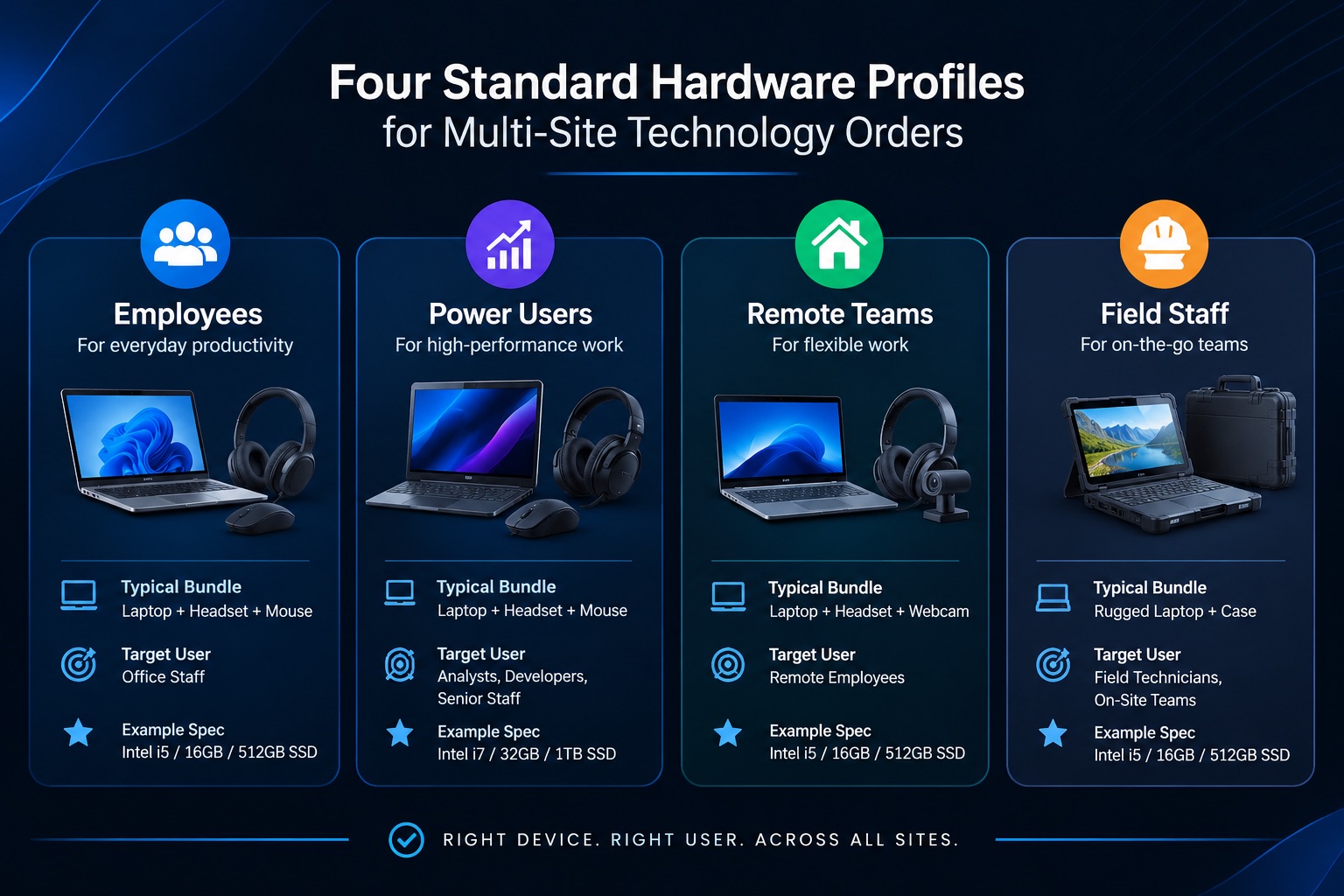
Three or four profiles are usually enough. They reduce the number of distinct products you buy, which strengthens your negotiating position and simplifies support.
Forecast Growth and Turnover
Add a buffer for new hires, replacements and spare units at each site. Hiring plans matter here, and our onboarding checklist for new team members shows how equipment readiness fits into a new employee's first days. A small cushion of spares avoids rush purchases at full price later.
Step 2: Standardize Specifications Across Locations
Standardization is what turns many small orders into one large, comparable purchase. It also makes every later step easier.
Write one specification sheet per profile. Include processor class, memory, storage, screen size, operating system version, ports, warranty length and any required security features. Be specific enough that two vendors can quote the same product, yet flexible enough to accept an equivalent model if your preferred one is out of stock. The template below gives you a starting point.
Free Spec Sheet Template
Copy this table for each hardware profile and add a column of your own requirements alongside the example.
| Field | Standard office user (example) |
|---|---|
| Profile name | Standard office user |
| Form factor | 14" laptop |
| Processor class | Current-generation mid-range |
| Memory | 16 GB minimum |
| Storage | 512 GB SSD minimum |
| Operating system | Current business edition |
| Ports and accessories | USB-C dock, one external monitor |
| Security features | Disk encryption, TPM, fingerprint or camera sign-in |
| Warranty | 3 years with next-business-day support |
| Accepted equivalents | Documented in writing before purchase |
| Quantity by site | Dallas: __ / Phoenix: __ / Atlanta: __ |
| Required delivery date | Within 10 days of order confirmation |
Swipe the table to see all columns
Decide where local flexibility is allowed. A sales office might need extra mobile devices, while an accounting office might need larger monitors. Allow documented exceptions so site managers don't bypass the process.
Efficiency can be part of the specification too. If energy use affects your operating costs, you can require ENERGY STAR certified products in your purchasing language. The ENERGY STAR purchasing guidance explains how to build certification into procurement policies and contracts, and lists the covered office equipment categories, such as computers, displays and imaging equipment.
Step 3: Centralize Vendor Selection and Compare IT Equipment Quotes
Once your specifications are set, approach vendors with a clear and identical request.
Request Identical Quotes
Send every vendor the same request for quote (RFQ), including the specification sheet, quantities by location, delivery dates and warranty expectations. Identical requests produce comparable quotes, while different wording leads to different assumptions and unreliable comparisons. Our vendor quote comparison checklist explains what to line up: unit price, shipping, warranty, support terms, lead time and return conditions.
Negotiate Based on Total Volume
Present the full multi-site quantity rather than individual office quantities. Ask for tiered pricing, price protection for a fixed period, free shipping to multiple addresses, and configuration or imaging included in the price. If you plan repeat purchases, say so, since vendors often price more favorably for an ongoing relationship. For specific approaches, see our article on how to negotiate with technology vendors.
Vet Vendors for Security and Reliability
Cost is only part of the decision. Hardware and software travel through supply chains, and a poorly vetted supplier can introduce risk. The U.S. Cybersecurity and Infrastructure Security Agency (CISA) publishes ICT supply chain risk management resources, including guidance for small and medium-sized businesses and a vendor assessment template. These help you put consistent questions to suppliers about how they source and protect products. For a deeper framework, NIST SP 800-161 Rev. 1 covers cybersecurity supply chain risk management practices.
Buying from original manufacturers or authorized resellers is a straightforward way to reduce risk, so make it a standing requirement in your vendor criteria.
Planning a multi-location purchase and short on time?
The Black Skull's technology procurement team can build your specifications, run the quote comparison and negotiate on your total volume. Request a free consultation.
Step 4: Plan Shipping, Delivery and Staging for Multiple Sites
A well-priced order can still fail if delivery is chaotic. Plan multi-site logistics before the purchase order is released.
Confirm Ship-To Details for Every Location
Collect a verified address, a named receiving contact, delivery hours and any building restrictions for each site, such as loading docks, suite numbers or signature requirements. One wrong suite number can delay a shipment by days.
Decide Whether to Stage Centrally or Ship Directly
You have two common options:
- Central staging: Equipment ships to one location, where it is configured, labeled and tested before going on to each site. This gives the most consistent setup but adds a shipping leg.
- Direct shipping with pre-configuration: The vendor configures devices to your image and ships them straight to each office. This is faster, but it needs clear instructions and a reliable vendor.
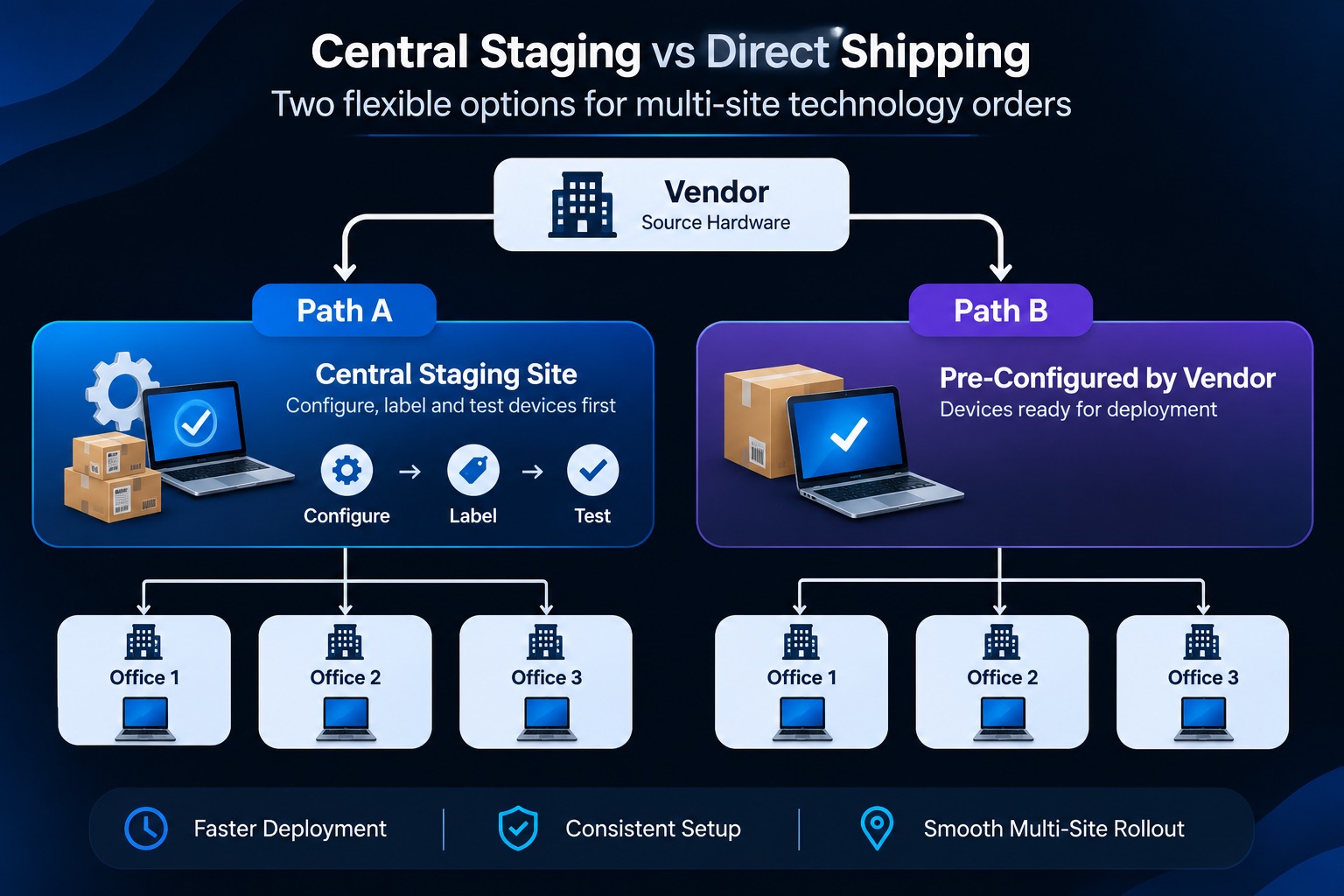
The right choice depends on volume, the number of locations, and how much your IT team can handle in-house.
Prepare a Receiving Checklist
Each site should confirm quantity, model, serial numbers and visible condition on arrival, and report discrepancies within a defined window. Record serial numbers at receipt so they flow directly into your asset records.
Step 5: Budget, Tax Treatment and Financing
Large technology purchases carry financial and tax implications worth planning around. This step covers how to pay, how to expense, and how to structure the rollout.
Choose How to Pay: Buy, Lease or Subscribe
There are three common ways to fund a large order:
- Outright purchase: You own the equipment from day one. This is usually the lowest total cost over the device's life and may qualify for the expensing options described below, but it needs the most upfront cash.
- Equipment loan or financing: A lender funds the purchase and you repay it over a fixed term, typically while still owning the equipment. This spreads the cost and preserves cash, though interest adds to the total.
- Leasing or device-as-a-service (DaaS): You pay a recurring fee that may bundle hardware, support and scheduled refreshes. This smooths the budget and simplifies lifecycle planning, but over several years it can cost more than buying, and the tax treatment differs from ownership.
Compare the total cost over the full refresh cycle, usually three to five years, rather than the monthly payment alone. Ask each provider about early-termination terms, end-of-term options, and who handles data wiping and disposal.
Understand Equipment Expensing
In the United States, Section 179 of the Internal Revenue Code lets many businesses deduct the cost of qualifying equipment in the year it is placed in service, rather than depreciating it over several years. Computers and business equipment can qualify. For tax year 2026, the commonly published limits are a $2,560,000 maximum deduction, with phase-out beginning at $4,090,000 of qualifying purchases. The deduction is also limited by business income.
Bonus depreciation is the other major option. It allows a business to deduct a large percentage of the cost of eligible property in the first year, and unlike Section 179 it is not capped by taxable business income. Recent federal legislation restored 100 percent bonus depreciation for qualifying property acquired after January 19, 2025. Businesses often use Section 179 and bonus depreciation together, and which one fits best depends on income, purchase size and state conformity rules, since some states do not follow the federal treatment.
These rules change, so check the current figures in IRS Publication 946 and on the IRS website, and confirm the treatment of your specific purchase with a qualified tax professional. Timing matters too, because equipment generally must be placed in service within the tax year to count for that year.
Choose Between One Large Order and a Phased Rollout
One large order captures the best volume pricing and the cleanest standardization. A phased rollout spreads the cash outlay and reduces installation workload. Many businesses combine the two: a single master agreement with fixed pricing, and delivery in waves by location. That way you keep the discount without forcing every site to upgrade at once.
Account for State and Local Differences
Sales tax, shipping charges and exemption rules vary by state. When ordering for locations in different states, ask the vendor how tax will be applied to each shipment, and confirm that invoices separate it clearly by ship-to address. Your accountant can advise on exemptions and documentation requirements.
Step 6: Track IT Assets Across Every Location
Ordering is only half of the lifecycle. Once equipment arrives, you need to know where it is and who has it.
Build a Single Asset Register
Record each device's serial number, model, purchase date, price, warranty end date, location and assigned user. Update the register whenever equipment moves or is retired. A central register also makes the next bulk order easier, because you can see what is approaching replacement.
Align Asset Tracking With Security Practice
Knowing what you own is a security basic as much as an accounting one. The NIST Cybersecurity Framework treats asset management as a core activity, on the principle that you can't protect what you haven't identified.
Plan for Retirement
Decide in advance how old devices will be wiped, recycled or redeployed, and handle data on retired equipment according to your security policy. Build this into the order plan so replaced devices don't pile up in storage closets.
Common Mistakes in Bulk and Multi-Site Technology Ordering
- Ordering before auditing. Buying without an inventory leads to duplicates and gaps.
- Letting every site pick its own models. This undoes the standardization that gives bulk purchasing its value.
- Comparing quotes with different assumptions. One quote includes shipping and warranty, another doesn't, and the "cheaper" option turns out to cost more.
- Ignoring lead times. Large orders can take longer to fill, so order early enough to meet deployment dates.
- Forgetting support terms. A low price with weak warranty service can cost more over three years than a slightly higher price with strong coverage.
- Skipping receiving checks. Damaged or incorrect items found weeks later are harder to return or replace.
- Treating the order as a one-time event. Without asset tracking and a refresh schedule, you will repeat the same scramble in a few years. For other challenges that commonly surface, read about technology procurement challenges businesses face in 2026.
Who Should Own the Process?
Someone must be accountable for the whole business technology procurement sequence. In a smaller company that might be an operations manager. In a larger one, it could be a dedicated procurement lead working with IT and finance. What matters is that one person or team owns the specifications, the vendor relationship and the approval workflow, while site managers supply their needs and confirm receipt.
If your team lacks the time or purchasing experience, a business support partner can take on the coordination work. Our operations cost reduction services and back-office support services are designed to lift routine procurement administration off busy teams. Newer tools can also speed up comparison and tracking, which we discuss in AI in procurement.
Sample Rollout Timeline
| Phase | Typical activities | Suggested timing |
|---|---|---|
| Assessment | Inventory, needs by site, role profiles | Weeks 1–2 |
| Specification | Write spec sheets, set budget | Weeks 2–3 |
| Sourcing | Request and compare quotes, negotiate | Weeks 3–5 |
| Approval | Final selection, purchase order, tax review | Week 6 |
| Delivery | Staging, shipping, receiving checks | Weeks 7–10 |
| Closeout | Asset register update, retire old devices | Weeks 10–12 |
Swipe the table to see all columns
Timing varies with order size and supplier availability, so treat these ranges as a starting point rather than a promise.
Conclusion: Make Ordering a Process, Not a Series of Events
Bulk and multi-site technology ordering works because it replaces scattered decisions with one repeatable process. You audit what you own, define standard profiles, request comparable quotes, negotiate on total volume, plan delivery site by site, handle tax and financing deliberately, and track every device afterward. Each step cuts cost and confusion, and the next order gets easier because the groundwork is already in place.
If you would like help planning a multi-location purchase, from specifications to vendor negotiation and delivery coordination, explore The Black Skull's technology procurement services, contact our team, or send an inquiry. You can also browse more guides on the Black Skull blog.
Need local support?
If you operate in Arizona, our team also offers region-specific help; see our page on technology procurement services in Arizona.
Frequently Asked Questions
How many units do I need to qualify for bulk pricing?
There is no universal threshold. Some vendors offer tiers at modest quantities, while others reserve their best terms for much larger orders. Ask each vendor where their price breaks occur, and present your combined multi-site quantity.
Is it better to buy everything at once or in phases?
It depends on cash flow and installation capacity. A single master agreement with scheduled deliveries often captures volume pricing without overwhelming your team.
How do I order computers in bulk for multiple offices without mismatched setups?
Define role-based hardware profiles, write one specification sheet for each, and send identical requests to all vendors. Then ask for pre-configuration so devices arrive consistent.
What is the best way to buy laptops in bulk for a business?
Define role-based hardware profiles, count the units each location needs plus a small spare buffer, then request identical quotes from several authorized resellers. Ask for tiered volume discounts, price protection and pre-configuration, and compare total cost over the full warranty period rather than unit price alone.
What is multi-site technology procurement?
It is the process of sourcing, approving, delivering and tracking technology across several business locations under one coordinated plan, rather than letting each office buy on its own. The goal is consistent equipment, one vendor relationship and a single view of spending and assets.
Can small businesses benefit from bulk technology ordering?
Yes. Even a company with two or three locations can consolidate purchases, standardize models and negotiate better terms than separate small orders would allow.
What should be in a bulk IT equipment quote?
Unit price, quantities by site, shipping and delivery terms, warranty length, support options, lead time, return policy and tax treatment. The vendor quote comparison checklist covers each item.
Do bulk purchases have tax advantages?
Not by themselves. Section 179 and bonus depreciation apply to qualifying equipment whether you buy one laptop or a hundred. What bulk ordering can do is concentrate more qualifying spending into a single tax year, which may make these deductions more significant. Rules and limits change, so verify with IRS guidance and a tax professional.
Equipping More Than One Office?
We build the specifications, run the quote comparison and negotiate on your total volume, then coordinate delivery to every site.
Contact Us Today